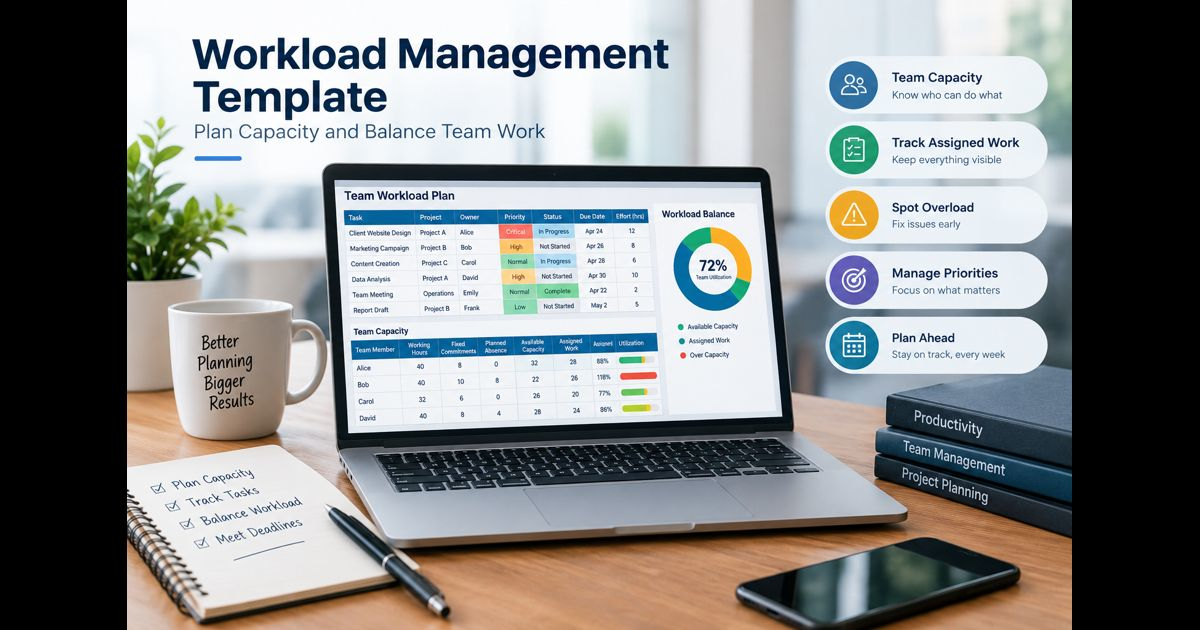
A workload management template gives a team one place to compare assigned work with the time and capacity available to complete it. A useful template records each task, owner, priority, estimated effort, due date, status, dependencies, and the amount of working capacity each person actually has.
The important distinction is that workload is not simply the number of tasks assigned to someone. Five short routine tasks may require less effort than one complex deliverable. A reliable workload plan therefore measures demand against realistic capacity rather than counting assignments alone.
A practical workload management template can be built in Excel, Google Sheets, or a work-management system. The underlying structure should remain simple enough to answer three questions quickly:
- What work is committed?
- Who has capacity to complete it?
- What needs to change when demand exceeds capacity?
Workload Management Template
Use the following fields as the core of the template.
|
Field |
What to record |
|
Task |
Specific piece of work or deliverable |
|
Project |
Project, client, department, or workstream |
|
Owner |
Person responsible for completing the task |
|
Priority |
Critical, high, normal, or low |
|
Status |
Not started, in progress, blocked, or complete |
|
Start date |
When work can or should begin |
|
Due date |
Required completion date |
|
Estimated effort |
Expected hours or another consistent effort unit |
|
Remaining effort |
Estimated work still required |
|
Dependency |
Work that must happen before or after the task |
|
Capacity period |
Day, week, sprint, or other planning period |
|
Notes |
Constraints or information affecting delivery |
For most teams, remaining effort is more useful than the original estimate once work has started. A ten-hour task with eight hours already completed should not continue consuming ten hours in the next capacity calculation.
Team Capacity Template
Task information alone cannot show whether a workload is reasonable. A second section should establish available capacity.
|
Team member |
Working hours |
Fixed commitments |
Planned absence |
Available capacity |
Assigned work |
Capacity status |
|
Alex |
40 |
8 |
0 |
32 |
29 |
Available |
|
Jordan |
40 |
10 |
8 |
22 |
26 |
Over capacity |
|
Sam |
32 |
6 |
0 |
26 |
20 |
Available |
The basic calculation is:
Available capacity = Working time − fixed commitments − planned absence
Fixed commitments can include recurring meetings, routine administration, support duties, reporting, or other responsibilities that consume time but may not appear as project tasks.
Then compare assigned effort with available capacity:
Capacity utilization = Assigned effort ÷ Available capacity × 100
If someone has 32 available hours and 24 hours of assigned work:
24 ÷ 32 × 100 = 75% utilization
The percentage should be treated as a planning signal rather than a performance score.
Do Not Assume 100% Utilization Is the Target
Filling every available hour with planned tasks creates a schedule with no room for interruptions, revisions, questions, urgent requests, or estimates that prove inaccurate.
The appropriate buffer depends on the work.
Predictable production work can usually be planned more tightly than roles involving customer requests, incident response, management responsibilities, creative work, or frequent changes in priority.
Instead of applying one universal percentage, define a planning threshold for the team. For example:
|
Capacity status |
Example interpretation |
|
Available |
Enough capacity remains for additional planned work |
|
Near capacity |
Commitments are close to the team's planning limit |
|
Over capacity |
Planned demand exceeds the agreed capacity limit |
|
Uncertain |
Estimates or availability are not reliable enough for a decision |
This approach prevents a percentage from creating false precision.
How to Build a Workload Management Template
1. Choose a Useful Planning Period
Weekly planning works well for many operational teams because it is short enough to react to changes but long enough to expose workload imbalances.
Daily planning may suit service or support environments. Sprint-based planning can work for teams already operating in fixed iterations. Monthly views are useful for forecasting but can hide short periods of severe overload.
The template can contain several time horizons, but workload decisions should be made at a level where capacity can realistically be changed.
2. Record All Committed Work
List active and approved work before assigning additional capacity.
Include:
- project deliverables;
- recurring responsibilities;
- maintenance work;
- scheduled reviews;
- administrative commitments;
- known support duties; and
- work already started but not completed.
Leaving routine responsibilities outside the template makes employees appear more available than they really are.
Avoid filling the plan with every possible future idea. Separate committed work from a backlog so tentative work does not distort current demand.
3. Give Every Task One Accountable Owner
A task can involve several contributors, but the workload plan should make accountability clear.
If several people need substantial time for the same deliverable, represent their contributions separately or allocate effort to each participant. Assigning a 20-hour task to one owner when four people each need five hours hides the workload from the other three people.
4. Estimate Effort, Not Just Duration
A task that lasts from Monday through Friday does not necessarily require five days of work.
Track the amount of active effort expected from the owner.
For example:
- Task A runs for five days but requires 6 hours.
- Task B runs for two days and requires 12 hours.
A calendar based only on start and end dates can make Task A appear larger even though Task B consumes twice as much working capacity.
Use hours when reasonably predictable. Teams that cannot estimate hours reliably can use a consistent relative system such as small, medium, and large or points, provided capacity is measured in compatible units.
5. Calculate Real Available Capacity
Start with contractual or scheduled working time and remove known unavailable time.
Suppose an employee has a 40-hour workweek with:
- 5 hours of recurring meetings;
- 3 hours of routine administration;
- 8 hours of planned leave.
Available capacity is:
40 − 5 − 3 − 8 = 24 hours
Assigning 35 hours of project work because the employee has a nominal 40-hour week would create an 11-hour capacity deficit before unexpected work occurs.
6. Add Priority Without Making Everything High Priority
Priority should influence what gets capacity when all requested work cannot fit.
A simple four-level model is sufficient for many teams:
Critical: delay creates immediate operational, contractual, safety, customer, or material business consequences.
High: important work with a meaningful near-term deadline or dependency.
Normal: necessary work that should proceed after higher-priority commitments.
Low: work that can be delayed without a significant consequence.
Priority and due date should remain separate fields. A task can be important without being due immediately, while an approaching deadline does not automatically make low-value work strategically important.
Account for Dependencies
Capacity can appear balanced while the schedule remains impossible.
Consider this sequence:
|
Task |
Owner |
Effort |
Dependency |
|
Prepare draft |
Mia |
8h |
None |
|
Review draft |
Noah |
3h |
Prepare draft |
|
Final revisions |
Mia |
4h |
Review draft |
Mia may have 12 hours of total available capacity, but she cannot necessarily perform all 12 hours consecutively. Four hours of her work are blocked until Noah completes the review.
Dependencies therefore affect when capacity can be used, not just how much capacity exists.
A workload template should flag blocked work and predecessor tasks so managers do not mistake unused time for freely available capacity.
Use Remaining Effort for Work in Progress
Initial estimates become less useful after work begins.
Suppose a task was originally estimated at 16 hours. After one week, 10 hours of useful work have been completed and approximately 8 hours remain because additional complexity was discovered.
The next workload plan should use the new 8-hour remaining estimate, not automatically subtract 10 from the original estimate and assume six hours remain.
Re-estimating unfinished work keeps the plan connected to current conditions.
How to Balance an Overloaded Workload
When assigned demand exceeds capacity, changing the spreadsheet is not enough. Something about the work must change.
There are five main options.
Reassign Work
Move suitable tasks to someone who has both the capacity and the required skills.
Capacity alone does not make a person an appropriate replacement. Consider experience, access, context, and the time required for a handoff.
Change the Sequence
Move lower-priority work to a later period while protecting more important commitments.
This is often less disruptive than dividing partially completed work among additional people.
Adjust Scope
If a deadline cannot move, reduce the amount of work required where the deliverable permits it.
Scope reduction should be explicit. Quietly expecting the same result from fewer hours simply transfers the scheduling problem to the employee.
Change the Deadline
Move the completion date when the business consequence of delay is smaller than the cost or risk of overloading the team.
Add Capacity
Temporary help, additional staffing, specialist support, or approved extra resources may be appropriate when demand is both important and genuinely cannot be deferred.
Adding people is not always an immediate capacity increase. New contributors may require onboarding, coordination, or knowledge transfer, so the short-term effect should be considered before changing the plan.
Worked Workload Example
Consider a team member with 30 hours of usable capacity for the week.
|
Task |
Priority |
Remaining effort |
Due |
|
Client deliverable |
Critical |
12h |
Wednesday |
|
Monthly report |
High |
6h |
Friday |
|
Process update |
Normal |
8h |
Friday |
|
Documentation cleanup |
Low |
7h |
Next week |
Total assigned work is 33 hours, which already exceeds the 30 available hours.
More importantly, treating all 30 hours as fully allocatable may leave no operating buffer.
A reasonable decision could be to protect the client deliverable and monthly report, schedule the process update around the remaining capacity, and move the documentation cleanup into the following week.
The purpose of the template is not to make 33 hours somehow fit into 30. It is to make the conflict visible early enough for someone to make a deliberate trade-off.
Weekly Workload Review
A workload template becomes unreliable when it is filled in once and then ignored.
A short weekly review should examine:
- capacity changes caused by leave or new commitments;
- work completed since the previous review;
- revised remaining estimates;
- overdue tasks;
- blocked work;
- newly approved requests;
- tasks approaching the capacity limit;
- dependencies that could delay other people; and
- work that should be reassigned, deferred, reduced, or cancelled.
Teams with rapidly changing work may need shorter reviews during the week. Stable teams may need less frequent adjustment.
Update the template when meaningful changes occur rather than waiting for the next formal meeting if a delay would affect other commitments.
Workload Management Template for Multiple Projects
When employees contribute to several projects, a project-by-project plan can conceal overload.
An employee might look reasonably allocated inside each project:
- Project A: 12 hours
- Project B: 10 hours
- Project C: 9 hours
- Recurring work: 6 hours
Viewed separately, none appears excessive. Combined, they require 37 hours.
If the employee has only 30 hours of available capacity, the portfolio creates a seven-hour deficit.
For multi-project teams, maintain a consolidated workload view that brings assignments from every active project into the same capacity calculation.
Workload Management Template for Recurring Work
Recurring work should not disappear simply because it does not belong to a major project.
Examples include:
- weekly reporting;
- inbox or queue management;
- customer support;
- team meetings;
- quality checks;
- administrative duties;
- maintenance;
- approvals; and
- routine coordination.
If recurring work is reasonably predictable, reserve capacity for it before assigning discretionary project work.
If it varies substantially, use historical ranges or a reasonable buffer rather than pretending the demand is known exactly.
Common Workload Template Mistakes
Counting Tasks Instead of Effort
Two employees with eight tasks each do not necessarily have equal workloads. Task complexity and required effort can differ dramatically.
Using Contracted Hours as Available Capacity
A 40-hour schedule does not mean 40 hours are available for project assignments. Meetings, leave, administration, and recurring duties consume part of that time.
Ignoring Work Across Other Projects
A project manager may see only the assignments inside one project while the same employee is committed elsewhere.
Treating Estimates as Facts
Effort estimates contain uncertainty. They should be updated when new information changes the expected work.
Ignoring Skills
An employee with spare hours may still be unable to take specialized work without substantial support.
Leaving Completed Work in the Calculation
Completed tasks should stop consuming future capacity even if they remain visible for reporting.
Using Workload Data as a Productivity Ranking
Capacity information is designed to improve planning. Comparing employees solely by assigned hours can reward overload and ignore differences in complexity, responsibility, experience, and work type.
Solving Every Conflict With Overtime
Repeated capacity deficits usually indicate a planning, staffing, scope, or prioritization problem. Extra hours can occasionally address a short-term exception but should not substitute for correcting a recurring mismatch between demand and capacity.
Spreadsheet or Workload Management Software?
A spreadsheet can be sufficient when the team is small, assignments change infrequently, and one person can keep the information current.
Excel or Google Sheets can handle:
- task lists;
- owners;
- estimates;
- available hours;
- utilization formulas;
- due dates;
- priority;
- status; and
- basic conditional formatting.
A dedicated system becomes more useful as work is distributed across many projects or changes frequently. Automated task updates, cross-project workload views, permissions, notifications, dependencies, historical information, and live capacity calculations reduce the amount of manual reconciliation required.
The decision should be based on coordination complexity rather than team size alone. A small team managing rapidly changing work can need a live system more than a larger team with highly predictable schedules.
A Minimum Viable Workload Template
A team does not need a complicated dashboard to begin.
At minimum, record:
Task | Owner | Priority | Due Date | Remaining Effort | Status
Then maintain a separate capacity table:
Team Member | Available Capacity | Assigned Effort | Remaining Capacity
Calculate:
Remaining capacity = Available capacity − Assigned effort
A positive number indicates unused planned capacity. A negative number exposes a capacity deficit that requires a decision.
Once the basic system is reliable, add dependencies, project fields, skills, recurring commitments, or forecasting only when they improve an actual planning decision.
What a Good Workload Template Should Tell You
A well-maintained workload management template should make it possible to determine, without reconstructing the plan manually:
- who owns each active commitment;
- how much effort remains;
- how much capacity each person has;
- where demand exceeds capacity;
- which work matters most;
- which deadlines are at risk;
- what is blocked;
- which tasks depend on other work;
- where capacity may be available; and
- what decision is required to restore a workable plan.
If the template contains extensive data but cannot answer those questions, it is tracking activity rather than managing workload.
Frequently Asked Questions
What is a workload management template?
A workload management template is a reusable planning structure for comparing assigned work with available team capacity. It normally records tasks, owners, priority, effort, deadlines, status, and capacity so workload conflicts can be identified and resolved before they disrupt delivery.
What should be included in a workload management template?
At minimum, include task, owner, priority, due date, status, estimated or remaining effort, and available capacity. Teams managing interconnected work should also record dependencies, projects, recurring commitments, start dates, and planned absence.
How do you calculate employee workload?
First calculate usable capacity by subtracting planned absence and fixed commitments from scheduled working time. Then total the effort assigned during the same period. Dividing assigned effort by available capacity gives a utilization percentage, while subtracting assigned effort from capacity shows the remaining capacity or deficit.
How often should a workload template be updated?
Update it whenever a meaningful change affects capacity or delivery. For many teams, a weekly review provides a useful baseline, while fast-changing operational environments may require updates several times during the week.
Can a workload management template be used in Excel or Google Sheets?
Yes. A spreadsheet is sufficient for many small or relatively stable teams. The essential requirement is not a particular application but consistent task information, realistic capacity calculations, regular updates, and clear decisions when demand exceeds available capacity.
What is the difference between workload and capacity?
Workload is the amount of work assigned or expected during a period. Capacity is the amount of usable time or effort available to perform that work. Effective workload management compares the two rather than treating either measure in isolation.
Final Thoughts
A workload management template is most valuable when it exposes decisions rather than merely documenting assignments. The plan should show the work that has been committed, the effort still required, the capacity actually available, and the conflicts that need to be resolved.
Keep the structure simple enough to maintain, account for work across projects and recurring responsibilities, update remaining estimates as conditions change, and avoid treating every nominal working hour as assignable capacity.
When the workload exceeds what the team can realistically deliver, the correct response is a visible trade-off: reassign work, change its sequence, reduce scope, move a deadline, or add appropriate capacity. A template that makes those decisions possible is doing its job.