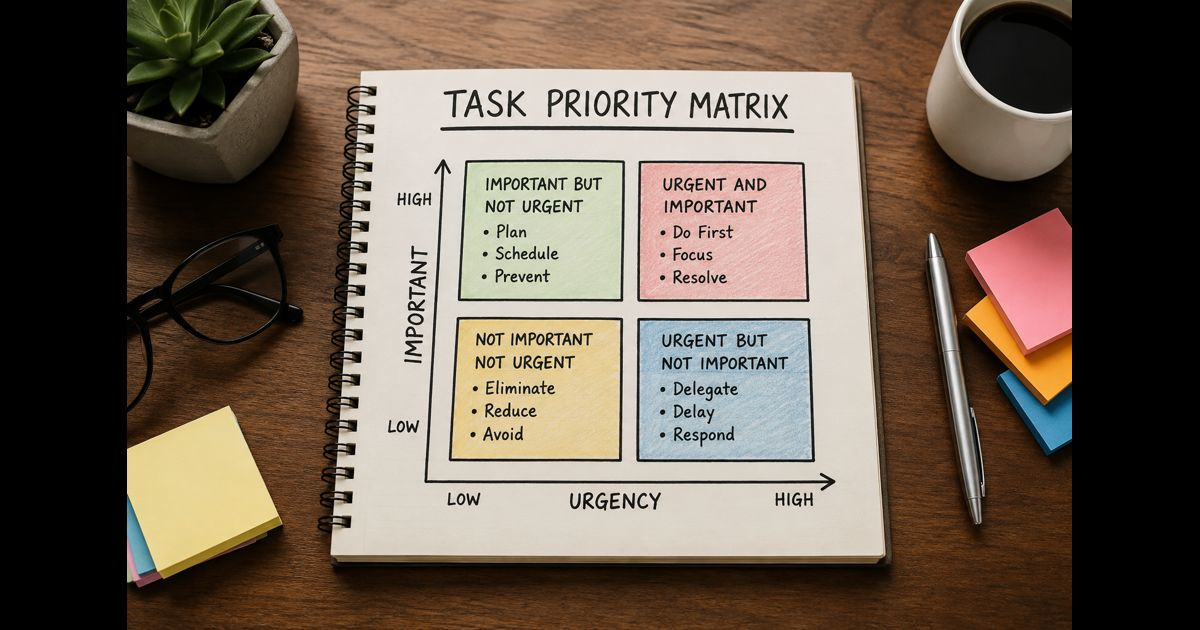
A task priority matrix is a simple visual framework for deciding what deserves attention now, what should be scheduled, what can be assigned elsewhere, and what should be removed from the plan.
Its value is not in making every task look precise. It creates a shared decision rule when deadlines, requests, and limited capacity compete. Used well, it stops a team from treating the loudest request as the most important work.
Two four-quadrant models are often called a task priority matrix:
- The Eisenhower Matrix sorts work by urgency and importance.
- The Action Priority Matrix sorts work by impact and effort.
They should not be used interchangeably. Choose the first for daily and weekly workload decisions; choose the second when comparing projects, improvements, or backlog items.
Start with a complete, visible task list
A matrix cannot improve a partial list. Before sorting, gather work from email, meetings, project boards, recurring responsibilities, customer commitments, and requests from other teams.
Write each item as a clear outcome, not a vague label.
Weak: “Website issue”
Clear: “Restore the checkout form so customers can submit orders.”
Weak: “Marketing”
Clear: “Approve the product launch email before Thursday’s scheduled send.”
For team work, include the owner, deadline, dependency, and expected result beside every item. This keeps a task from being placed in a quadrant simply because someone remembers it differently.
A reliable workflow intelligence process makes this easier: work should be visible before it is evaluated.
The Eisenhower task priority matrix
The Eisenhower Matrix uses two questions:
- Is this urgent?
- Is this important?
Urgent work has a near-term consequence if it is not handled promptly. Important work materially supports a business goal, customer commitment, safety obligation, legal requirement, or key project outcome.
|
Quadrant |
Meaning |
Appropriate action |
|
Urgent and important |
Consequences are immediate and meaningful |
Do it first |
|
Important, not urgent |
Valuable work with time to plan |
Schedule protected time |
|
Urgent, not important |
Time-sensitive but does not require your ownership |
Delegate or redirect |
|
Not urgent, not important |
Little meaningful benefit |
Remove, defer, or reduce |
Urgent and important: do first
These tasks need prompt action because delay creates a real cost.
Examples include:
- Fixing a checkout failure affecting current customers
- Responding to a security incident
- Completing an accurate report required today
- Handling a customer escalation where a service commitment is at risk
This quadrant should be small. If most work lands here every week, the issue is rarely personal discipline alone. It may point to weak planning, unclear ownership, inadequate staffing, or too many simultaneous commitments.
Important, not urgent: schedule it
This is where preventive and strategic work belongs. It often produces the greatest long-term value but loses to interruptions unless time is reserved.
Examples include:
- Documenting a recurring process
- Testing a backup and recovery procedure
- Preparing next month’s campaign
- Improving onboarding
- Reviewing project risks before they become deadlines
Put these tasks on a calendar with a named owner and a meaningful checkpoint. “Do later” is not a plan. A scheduled review on Tuesday at 10:00 is.
Urgent, not important: delegate or redirect
A request may be time-sensitive without requiring your expertise or personal attention.
Examples include:
- Confirming a meeting time
- Collecting routine information
- Updating a status field
- Routing a standard customer request
Delegation is not abandoning responsibility. It means assigning the work to the person or process best suited to complete it. Give enough context, define the result, and agree on a completion time.
Not urgent and not important: remove it
This quadrant includes work that neither protects a commitment nor advances a useful outcome.
Examples include:
- Reformatting an internal document with no reader need
- Attending a meeting without a decision, contribution, or learning purpose
- Rechecking information that has not changed
- Producing reports nobody uses
Before deleting an item, make sure it is not a hidden dependency. If it is not, remove it from the active list. A priority system fails when low-value work remains visible as an implied commitment.
The Action Priority Matrix
Use the Action Priority Matrix when deciding which proposed initiatives, improvements, or projects deserve resources. Its questions are different:
- How much impact will this create?
- How much effort will it require?
Impact can include revenue protection, customer value, risk reduction, quality improvement, time saved, or progress toward a defined objective. Effort includes time, cost, specialist capacity, technical complexity, and coordination.
|
Quadrant |
Meaning |
Appropriate action |
|
High impact, low effort |
Quick win |
Start soon |
|
High impact, high effort |
Major project |
Plan, sequence, and resource |
|
Low impact, low effort |
Fill-in work |
Do only when capacity permits |
|
Low impact, high effort |
Poor return |
Avoid, redesign, or pause |
A quick win might be fixing a broken call-to-action that prevents leads from reaching a contact form. A major project could be replacing a fragmented approval process across several teams. Both may matter, but they need different planning.
Do not let “low effort” become the only reason to act. Ten small jobs with little value can still consume the time needed for one major outcome.
Decide which matrix to use
Use this quick distinction:
- Use urgency and importance for work already on your desk.
- Use impact and effort for choosing between possible work.
- Use both when a team must decide what to fund and then manage daily execution.
For example, a team may use impact and effort to select a customer self-service project for the quarter. Once the project begins, the team can use urgency and importance to manage defects, approvals, and day-to-day tasks.
This separation helps turn execution intelligence into practical action: choose the right work, then protect the work from being displaced.
Score tasks consistently
A matrix is only as useful as the criteria behind it. Teams should agree on what their labels mean before placing tasks.
Define urgency by consequence, not pressure
A task is urgent when delay causes a specific near-term outcome, such as:
- A contractual deadline will be missed
- A customer cannot use a paid service
- A compliance obligation is due
- Another person cannot proceed without the work
“Someone asked for it today” is not enough on its own. Ask: what happens if this is completed tomorrow instead?
Define importance by contribution
A task is important when it supports a stated priority or prevents significant harm. It should connect to at least one of these:
- Customer trust or service quality
- Revenue or cost control
- Legal, security, or operational risk
- A committed project milestone
- A measurable team objective
If that connection cannot be explained in one sentence, the task may need a lower position.
Make dependencies visible
A task that blocks five people may need priority even if it is small. Conversely, a large task may be delayed safely if nothing depends on it.
Add a dependency check before finalizing the matrix:
- What work cannot start until this is completed?
- Who is waiting?
- Is there a fixed external date?
- Can the work be split so the blocking part happens first?
This prevents teams from treating every large task as indivisible.
A worked example
Imagine a small team has these five items on Monday morning:
- A client cannot access a paid account.
- A manager requests slides for a meeting next week.
- A recurring report needs an updated logo.
- Customer questions reveal confusion in the account setup process.
- The team wants to rewrite every internal template.
Using the Eisenhower Matrix:
- Client access issue: urgent and important — resolve first.
- Next week’s slides: important, not urgent — schedule focused preparation time.
- Logo update: urgent but not important — assign to the appropriate owner.
- Account setup improvement: important, not urgent — create a scoped task and schedule discovery.
- Rewrite every template: neither urgent nor clearly important — pause until there is evidence of value.
For the account setup improvement, use the Action Priority Matrix next. A short clarification message on the setup page may be high impact and low effort. A complete redesign may be high impact but high effort. Both can be useful; the first should not wait for the second.
Set a decision rule for competing priorities
A quadrant groups tasks; it does not always rank them fully. When two items land in the same quadrant, compare them with a consistent sequence:
- Protect people, legal duties, security, and customer access.
- Address fixed commitments with the nearest real deadline.
- Remove blockers affecting multiple people or projects.
- Choose the item with the clearest measurable outcome.
- If the decision remains unclear, ask the accountable owner to choose the trade-off.
This last step matters. A team cannot solve an authority problem with a prettier board. If priorities conflict, someone with responsibility for the outcome must decide which commitment changes.
Review the matrix at the right rhythm
Daily review is useful for individual work and active projects. Weekly review is better for planned work, capacity, and items that keep drifting. Monthly or quarterly review is useful for larger initiatives and resource allocation.
During each review, ask:
- What changed since the last review?
- Which scheduled important tasks were displaced, and why?
- Which urgent tasks were predictable?
- Which work can be simplified, automated, delegated, or stopped?
- Does current capacity match the commitments already made?
Repeated urgency is a signal to improve the underlying operating model, not merely work faster.
Common mistakes that weaken a task priority matrix
Treating every deadline as urgent
A deadline matters, but not all deadlines carry the same consequence. Separate a genuine commitment from an arbitrary target.
Calling every request important
Importance needs a connection to an agreed outcome. Without one, the matrix becomes a record of opinions.
Leaving important work unscheduled
A task placed in “schedule” will eventually become urgent if it has no date, owner, or protected time.
Delegating without authority or context
Delegation works only when the recipient has the necessary information, decision rights, and capacity.
Using the matrix once and never revisiting it
Priorities change when a customer issue emerges, a dependency shifts, or new information changes the expected value of work.
Final Thoughts
A task priority matrix gives work a visible logic. The Eisenhower Matrix helps decide what requires attention now; the Action Priority Matrix helps choose the work most worth doing. Used together, they replace reactive task switching with deliberate choices about time, effort, and responsibility.